
Reviews
Description
Game Introduction
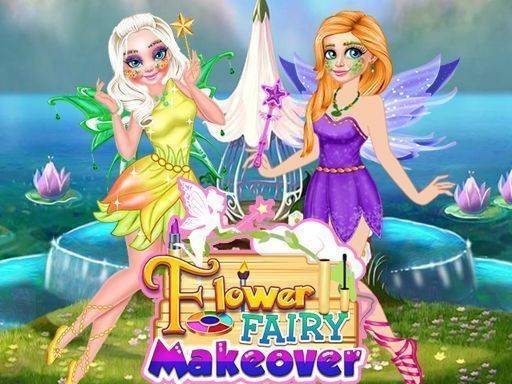
Flower Fairy Makeover: Dress Up Game invites you into a charming garden studio where two friends, Ava and Emma, dream of becoming magical flower fairies. This game focuses on creativity and style, allowing you to design unique fairy looks from start to finish. You begin in a sparkly, petal-filled space that sets a calm and joyful tone. The core concept is simple: use your imagination to mix and match makeup, outfits, and accessories to create enchanting fairy transformations. It is a family-friendly activity that combines beauty, fashion, and fantasy in a safe, relaxing environment.
How to Play
How to play is straightforward and intuitive. First, choose either Ava or Emma to begin their transformation. Then, enter the makeup studio to apply flower-themed cosmetics like soft blushes, sparkling eyeshadows, and pretty lip colors. After completing the makeup, move to the wardrobe to browse a wide selection of fairy dresses, skirts, and tops in various colors. Finally, select accessories such as a delicate flower crown, a sparkling wand, and matching fairy shoes. Use your mouse or tap to pick items and see your creation come to life instantly.
Game Features
Game features include: Create magical fairy makeup with flower-inspired colors. Choose from dozens of beautiful outfits and accessories. Enjoy a friendly and colorful game designed for all ages. The interface is simple and easy to navigate, making it accessible for younger players. Each play session offers new combinations, encouraging repeated exploration.
Tips for Success
You will enjoy Flower Fairy Makeover because it promotes creative expression without pressure. The gentle pace and positive themes make it a pleasant way to relax and have fun. It is ideal for anyone who loves fashion, fantasy, or simply unwinding with a lighthearted activity.
✅ Compatibility & Testing
All games on this site are manually tested on: • Desktop (Windows 11, macOS Ventura) • Mobile (iPhone 14, Samsung Galaxy S23) • Tablet (iPad Pro, Android tablet) 📌 Supported browsers: Chrome, Safari, Edge, Firefox (latest versions) 📌 Not supported: Internet Explorer, older browser versions
Related Games
Chibi DottedGirl Coloring Book
Simple, cheerful coloring game with adorable chibi characters. Great for young children.
Celebrity Tailor Shops Fashion Game
Creative and relaxing fashion game with clear goals. Perfect for style enthusiasts.
Princess Dress Up Game
Beautiful holiday dress up game with plenty of outfit options. Perfect for relaxing creative play.
Witch & Fairy BFF Dress Up
Sweet dress up game with lots of outfits. Great for creative kids who love magic and style.
Back to School Fashion Dress Up
Creative and educational dress up game. Great for learning about global fashion in a fun way.
Winter Fashion Dress Up Game
A calm dress up game with cute winter clothes. Great for creative relaxation.
Fantasy Dress Up Game
Colorful dress up game with friendly monsters. Easy to play and safe for kids.
Cherry Blossom Dress Up Fashion
Beautiful spring outfits and easy controls. A calming dress up game for fashion lovers.
Fashion Box: Glam Diva Dress Up
A fun dress up game with many fashion choices. Easy to play and relaxing.
Fashion Dress Up Game
Creative mask styling and clear challenges. Unlockable items keep it engaging for fashion fans.