
Reviews
Description
Game Introduction
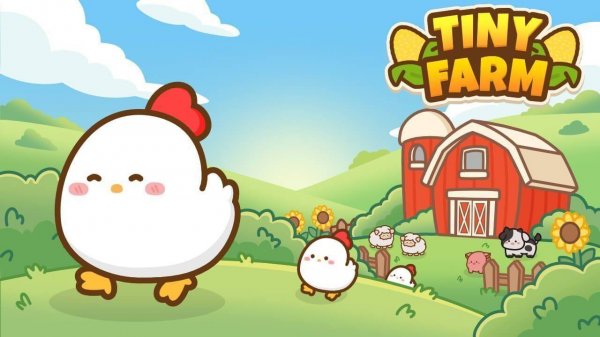
Tiny Farm is a casual simulation game that invites players to build and manage their own small farm. The core objective is to cultivate crops, raise animals, and gradually expand your homestead. What makes it unique is its focus on relaxation and gentle progression, offering a peaceful escape from fast-paced gaming. Players can expect a soothing experience centered on simple farming activities and visible growth over time.
How to Play
In Tiny Farm, players typically start with a small plot of land and a few basic resources. The main activities involve planting seeds, watering crops, and harvesting produce when ready. Players also care for farm animals, collecting items like eggs or wool. Resources gathered can be used to purchase upgrades, unlock new items, or expand the farm. The gameplay is designed to be intuitive, with straightforward taps or clicks to perform actions, and there are no strict timers or complex controls.
Game Features
Key features of Tiny Farm include a relaxing pace with no time pressure, allowing players to play at their own speed. The game offers a variety of crops to plant and animals to raise, each providing different goods. Players can unlock new themed worlds or areas, adding fresh scenery and goals. Visible farm upgrades, such as improved buildings or decorative items, show progress and personalize the farm. The overall design emphasizes calm and rewarding gameplay without stressful elements.
Tips for Success
To make the most of Tiny Farm, focus on consistent but unhurried play. Regularly check on your crops and animals to maximize yields. Prioritize upgrading essential buildings first, as they often unlock new features or increase efficiency. Experiment with different crops and animals to find a balanced routine. Take time to enjoy the visual improvements and personalize your farm, as the game rewards patience and steady effort. Remember, there is no rush—progress at your own pace.
Compatibility
💻 Desktop | 📱 Mobile | 📟 Tablet – All supported · Best with Chrome or Safari
Related Games

Squid Game Hunter: Stealth Adventure Puzzle Game
Clever stealth puzzles in a bright world. Smooth controls and good challenge. Ideal for short sessions.
Royal Puzzle Burst: Color Match Puzzle Game
Clean design and smooth gameplay. Great for short breaks or longer sessions. Family-friendly fun.

Pop Ball - Fun Bubble Popping Puzzle Game
Simple, colorful, and relaxing. Great for quick mental breaks without stress.
Split Shot: Ball Adventure - A Cosmic Puzzle Game | Arcade Puzzle Game
Clean visuals and smooth controls. Great for short puzzle sessions with family.

Galaxy Carnage: Starship Battle Arcade Game
Simple controls and rewarding upgrades. Great for quick space battles.
Ninja Runner: Arcade Adventure Game Arcade Game
Smooth controls and colorful graphics make this runner addictive. Perfect for quick play sessions.

Halloween Pop It Fidget Puzzle
A relaxing fidget game with charming Halloween graphics. Easy to play and great for stress relief.

Bouncy Christmas - Holiday Defense Arcade Game
Engaging bounce mechanics with festive charm. Simple controls and increasing difficulty keep it fresh.

Layer Man 3D: Run Collect - Arcade Runner Online Game
Colorful graphics and smooth controls make this runner enjoyable. Great for quick breaks.

Mees Kees Stacker: Fun Stacking Puzzle Game
Charming and challenging stacking game with great physics. Perfect for quick play sessions.